It’s 7:55 AM. You have your coffee in hand. You open your computer, log into your PrestaShop back office.
Click on “Dashboard”. Click on “Orders”. Click on “Stats”. You filter on “Yesterday”. You try to remember if the number is better than last Tuesday. You check the inventory…
Stop. 🛑
We all know this ritual. It’s reassuring, but it’s terribly passive. What if I told you that while you were still sleeping, an Artificial Intelligence has already scanned your store, analyzed your sales, detected an abnormal volume drop, and prepared a complete strategic briefing in your mailbox?
This isn’t science fiction. This is what I call the “Daily Merchant Morning”.
Today, I’m going to show you how to build this system. Not with complex systems or expensive custom developments, but with a modern, elegant, and formidable stack: n8n, AI, and the standard that’s changing everything: the MCP protocol.
Part 1: The Problem Isn’t Data, It’s Attention
As a developer and e-commerce expert, I make a simple observation: the modern merchant doesn’t lack data, they lack clarity.
PrestaShop is full of information. But transforming these order lines into business decisions takes time.
- “Did my promotion yesterday work?”
- “Why is my average cart declining?”
- “Which products will be out of stock in 48 hours?”
Until now, to answer these questions automatically, you had to:
- Either pay for prohibitively expensive B.I. (Business Intelligence) tools.
- Or ask a developer to create complex CSV exports or fragile API scripts.
But the arrival of LLMs (Large Language Models) and Low-Code automation tools like n8n is changing the game. We can now create Agents capable of reasoning about data.
The technical challenge was the connection. How to connect “the brain” (ChatGPT) to “the memory” (PrestaShop) in a simple and secure way?
That’s where the Model Context Protocol (MCP) comes in.
Part 2: Decrypting the MCP Architecture (The Secret of Fluidity)
Forget classic REST APIs where you have to code each request (GET /orders?date=yesterday...). With MCP, we enter the era of tooled AI.
To build our “Daily Merchant Morning”, we need a precise architecture on the PrestaShop side. It’s like a two-stage rocket:
1. The Foundation: PrestaShop MCP Server 🛡️
This is the essential foundation. Developed by the PrestaShop Team (and free on Addons), this module transforms your store into an “MCP Server”.
Concretely? It opens a secure and standardized door. It manages authentication and allows an AI agent to connect to your store without you having to manually manage complex OAuth tokens.
This is the pipe.
2. The Fuel: MCP Tools Plus ⚡
Once the pipe is laid, you need to pass interesting things through it. The base server is great, but for advanced business analysis, we need specific tools.
That’s where MCP Tools Plus comes in. It plugs into the server to add advanced “Tools” that the AI can call:
get_advanced_sales_stats: To get revenue, average cart, Y-1 comparison.get_best_sellers: To identify yesterday’s star products.analyze_stock_levels: To spot logistics emergencies.
It’s this combination of Infrastructure (PrestaShop) + Intelligence (Tools Plus) that makes the system super powerful.
Part 3: Putting It Into Practice (Your n8n Workflow)
Let’s get concrete. Here’s how I orchestrated all this in n8n.
The goal: Receive an HTML-formatted email every morning at 7:00 AM.
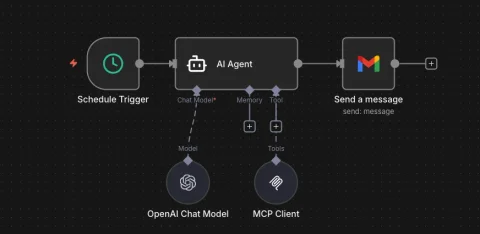
The Workflow at a Glance
 The diagram of my current workflow
Here’s the mechanism, step by step:
Step 1: The Wake-Up Call (Schedule Trigger)
Nothing fancy here. A cron node configured for Every Day at 07:00. Regularity is the key to ritual.
Step 2: The Brain (AI Agent + MCP Client)
This is where the magic happens.
I use an AI Agent node (connected to OpenAI GPT-4o or a powerful model). But careful, I don’t just give it text. I attach a “Tool” via the MCP Client node.
In the MCP Client configuration, I simply enter the credentials provided by the PrestaShop module.
The beauty of it? I don’t need to tell the AI how to fetch the revenue.
My system prompt looks like this:
You are an E-commerce expert. Use the tools at your disposal to retrieve yesterday's sales.
Compare them to the same day last week. Identify products with stock alerts.
Write a summary report in HTML format.
The AI will decide on its own: “Well, to answer Nicolas, I’ll use the get_sales_stats tool from the MCP Tools Plus module.”
Step 3: The Result (Gmail)
The agent returns a perfectly structured HTML block. I just pass it to the Gmail node to send it.
The Final Result
And here’s what arrives on my phone when I wake up:
 The morning email rendered by AI
Look at the level of detail:
- Dynamic KPIs: Revenue variation, average cart.
- Semantic Analysis: The AI wrote: “Good, but not enough. Volume is declining…“. It interprets the numbers!
- Priority Actions: It suggests to “Boost acquisition on Top 3”. It becomes a proposing force.
Part 4: Vision & Future Impact 🔮
What we just saw goes beyond a simple technical gadget. It’s a paradigm shift for us, developers and e-merchants.
1. The developer’s role evolves.
We’re no longer just “code writers” creating rigid modules. We become orchestrators. Our added value lies in our ability to connect intelligent blocks (PrestaShop, MCP, AI) to create value flows.
2. Commerce becomes proactive.
With this type of workflow, the merchant no longer suffers through their day. They attack it with a battle plan generated based on real data. We move from “Statement” to “Action”.
3. Technical accessibility.
Thanks to MCP, AI “understands” your store. Tomorrow, this workflow can be adapted to:
- Automatically respond to customer reviews.
- Generate product descriptions based on your best sellers.
- Reorganize your homepage based on yesterday’s trends.
The possibilities are infinite, and the technical barrier has never been lower.
Conclusion: Get Ahead
Automation isn’t here to replace the merchant, but to give them back the most precious resource: their available brain time.
Setting up this “Daily Merchant Morning” means getting yourself a senior data analyst assistant, available 24/7, for the price of a few API tokens.
🎁 Want to Set This Up Tomorrow Morning?
I know that configuring n8n, finding the right prompts to get a nice HTML table, and adjusting MCP connections can be intimidating if it’s your first time.
To save you time, I’ve exported my complete n8n Workflow (JSON file).
It’s ready to use. It contains:
- ✅ The complete flow structure.
- ✅ The advanced System Prompt (optimized for e-commerce analysis and HTML rendering).
- ✅ Pre-configuration for MCP Tools Plus tools.
To get started, just follow these 3 steps:
- Install the free PrestaShop MCP Server module to secure the connection.
- Add the MCP Tools Plus module to unlock AI analysis tools.
- Download the JSON file below and import it into n8n.
🚀 Need to Host n8n on a VPS?
If you’re looking for where to host your n8n workflows reliably and affordably, Hostinger offers high-performance VPS with excellent value for money. That’s actually where some of my own automation workflows run. The interface is intuitive, deployment is quick, and you can easily install n8n on their infrastructure. By using my referral code, you get -20% on your first hosting.
👉 Download the “Daily Merchant Morning” JSON Workflow here
Your turn. Make your store work for you, not the other way around!
Did you like this article? Share it with an e-merchant friend who spends too much time on Excel! 🚀