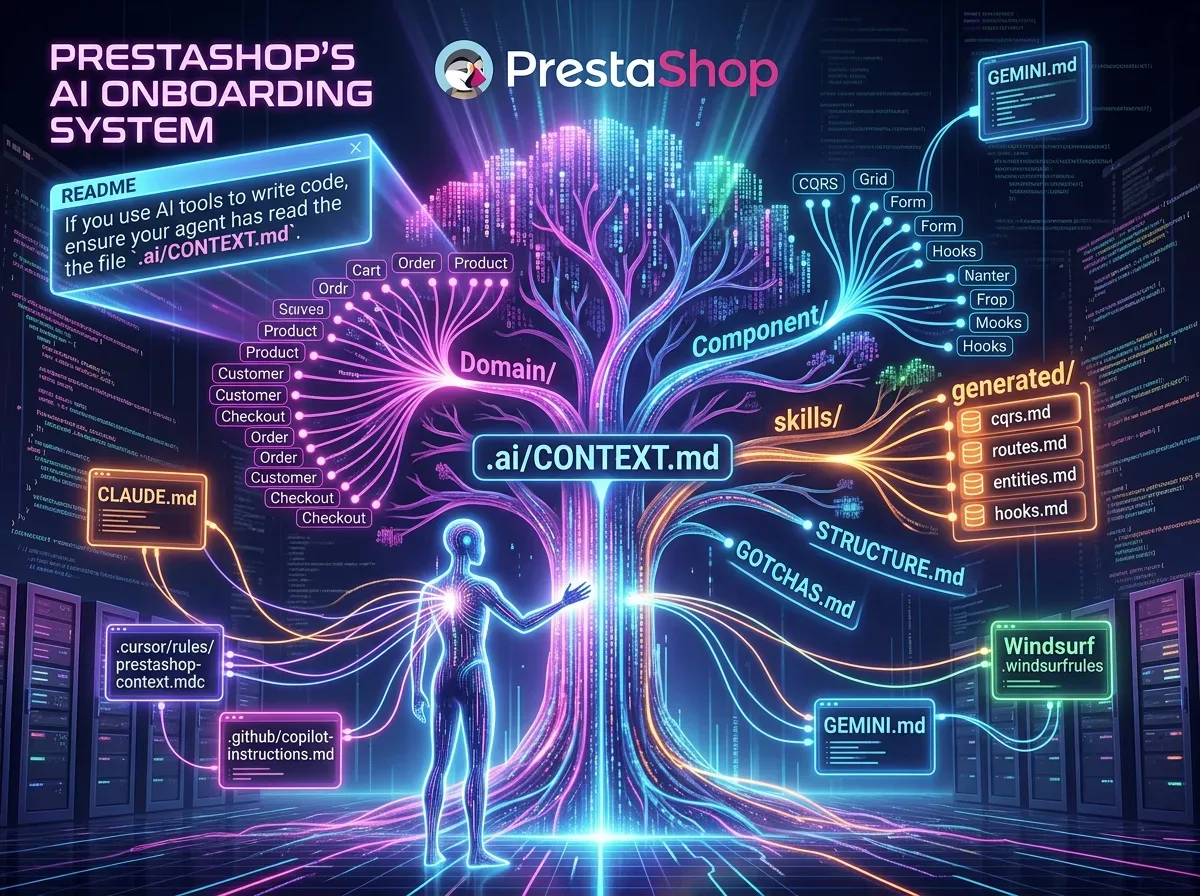
The PrestaShop core README now contains an instruction you'd never seen in an open source project of this scale: "If using AI tools to write code, make sure your agent has read the .ai/CONTEXT.md file."
TL;DR — If you only have 30 seconds: PrestaShop added a
.ai/folder to its core repo with 57 domain contexts, 22 component contexts, pre-generated indexes, and reusable skills. It's an AI agent onboarding system, versioned directly alongside the code. It's an approach I should have adopted earlier on my own modules.
🧠 What the .ai/ Folder Actually Is
The first time I saw this folder on the PrestaShop develop branch, I assumed it was an experiment. It's far more structured than that.
The .ai/ is a hierarchical context system for AI agents. The full structure:
.ai/
├── CONTEXT.md        ← global entry point
├── STRUCTURE.md      ← canonical template for writing new contexts
├── GOTCHAS.md        ← common pitfalls and tricky patterns
├── MULTISTORE.md     ← multistore-specific guidance
├── Domain/           ← 57 domain contexts (Cart, Order, Product...)
├── Component/        ← 22 component contexts (CQRS, Grid, Form...)
├── skills/           ← reusable task templates
└── generated/        ← pre-computed indexes (CQRS, routes, entities, hooks)
This isn't extra documentation. It's a context-feeding system designed for agents that will actually modify the code.
🔑 The Loading Mechanism: Pointer Files
The classic problem with AI agents on a large repo: they don't know what to read first. PrestaShop solves this with pointer files at the repository root.
Each tool reads its own entry file, which redirects to .ai/CONTEXT.md:
| Tool | Auto-read file |
|---|---|
| Claude Code | CLAUDE.md |
| Cursor | .cursor/rules/prestashop-context.mdc |
| GitHub Copilot | .github/copilot-instructions.md |
| Windsurf | .windsurfrules |
| Gemini CLI | GEMINI.md |
| Verdict | ✅ Zero config for the developer |
The navigation flow:
Tool reads CLAUDE.md
  → CLAUDE.md points to .ai/CONTEXT.md
    → CONTEXT.md lists available domains and components
      → Agent loads .ai/Domain/Cart/CONTEXT.md when relevant
No manual setup. You open the project, and the agent automatically reads the right context based on which files are open.
📊 What a Domain Context Contains
Each domain CONTEXT.md follows a standardized template defined in .ai/STRUCTURE.md. For the Cart domain, for example:
- Purpose — what this domain covers
- Architecture overview — key classes, services, and their relationships
- Coding standards — domain-specific conventions
- Do / Don't — explicit rules for this domain
- Testing expectations — what tests are required
- Canonical examples — reference files to follow
- Related skills — links to reusable task templates
This is exactly what you'd put in a system prompt when configuring an agent to work on a module. The difference: here it's versioned, shared, and maintained by the core team.
The 22 component contexts cover cross-cutting infrastructure: CQRS, Grid, Form, Hooks. These are the areas where an agent mistake propagates across the entire codebase — hence the extra care put into these files.
🚀 Pre-Generated Indexes: The Cleverest Part
The generated/ subfolder contains four pre-computed indexes:
cqrs.md— all existing CQRS commands and queriesroutes.md— routes indexentities.md— entities indexhooks.md— hooks index
Why does this matter? An agent adding an Admin API endpoint needs to know which CQRS queries already exist. Without this index, it hallucinates class names or re-proposes things that already exist. With the pre-computed index, it can check what's already there before proposing anything.
It's the same principle as the context-memory agent I built for my own projects — except here the PrestaShop team maintains these indexes as part of the project's normal development workflow.
⚠️ What This Requires from AI Contributions
The usage documentation is clear on this point: AI-generated code submitted as a contribution must meet the same quality standards as any other contribution.
Concretely, that means verifying the generated code:
- Follows the CQRS pattern where required
- Does not use
ObjectModelin new code - Respects multistore constraints
- Includes appropriate tests
This isn't a free pass. It's accelerated onboarding. The difference matters.
Conclusion
Let me be direct: PrestaShop's .ai/ folder looks like what technical documentation for agents should always have been — hierarchical, versionable, tool-agnostic. Does it replace a solid understanding of the codebase? No. Does it make an AI agent significantly more reliable on a project of this complexity? Absolutely.
I'll be adapting this approach on my own commercial modules. If you contribute to the PrestaShop core or build AI tooling on top of the ecosystem, read the CONTEXT.md before letting your agent touch the code.
Nicolas Dabène — PrestaShop & Laravel developer, custom solutions.