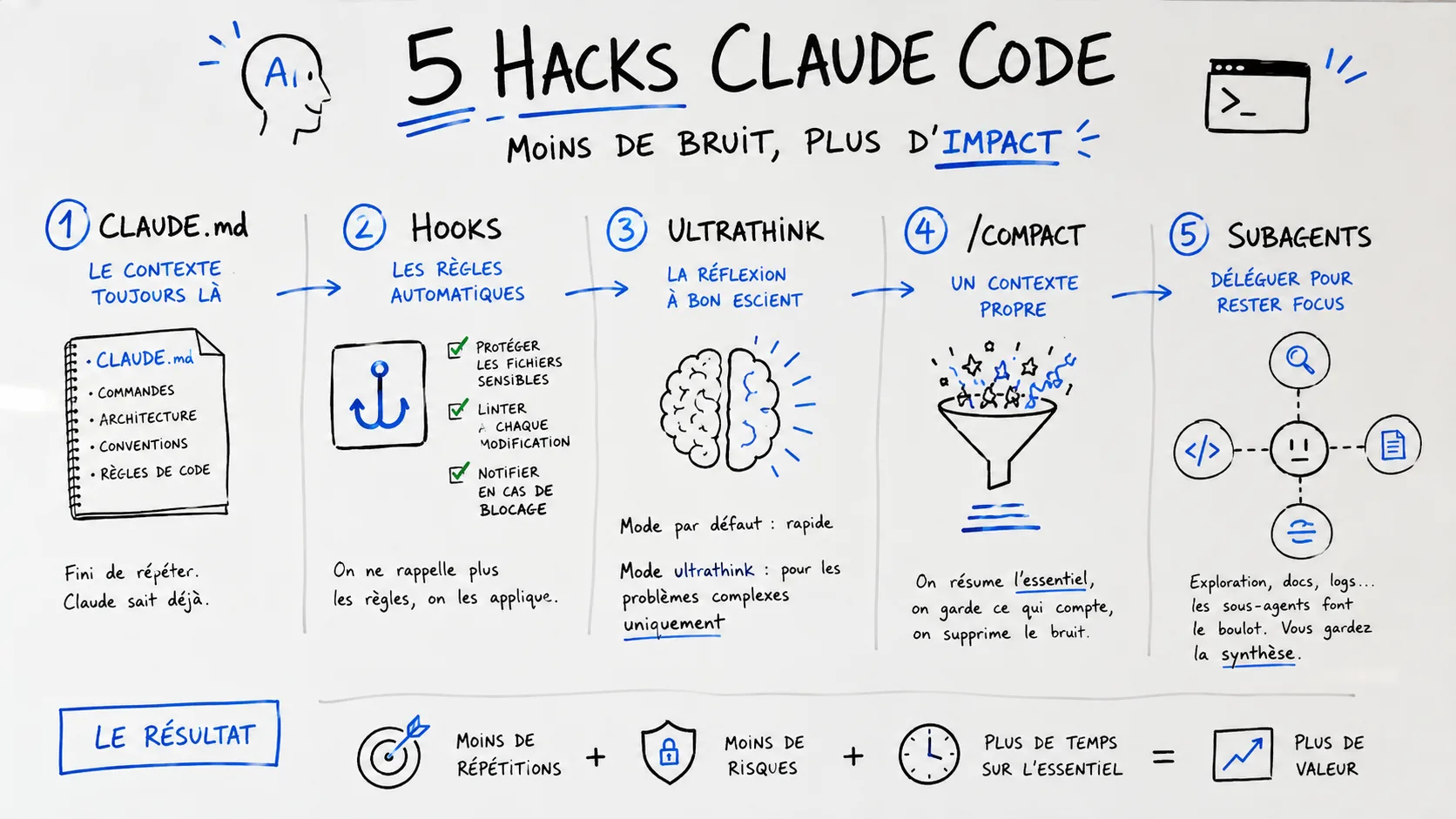
Most developers use Claude Code as a simple assistant capable of generating code.
Yet, the biggest gains don’t come from code generation itself.
They come from how you structure the context, protect the project, delegate tasks, and manage the agent’s working memory.
After several weeks of intensive use, five features stand out: CLAUDE.md, Hooks, ultrathink, /compact, and Subagents.
Used together, they transform Claude Code from a simple conversational tool into a true AI-assisted development environment.
🧠 The Problem Is Almost Never the Model
When a developer claims that Claude Code produced bad code, the issue rarely lies with the model itself.
In most cases, Claude works with incomplete context, implicit rules it doesn’t know, or memory cluttered by hours of exchanges.
This is exactly the same problem as with a human developer joining a project without documentation, conventions, or an overview.
The difference is that a human eventually understands the environment over weeks.
The AI, however, starts almost from scratch with each session.
This is why the most important features of Claude Code aren’t those that generate code.
They’re the ones that structure its working environment.
📄 CLAUDE.md: The File That Avoids Repeating the Same Things
Many teams spend their time reminding the agent of the same information:
- how to run tests;
- which commands to use;
- which conventions to follow;
- which architecture to adhere to.
This is a considerable waste of time.
Claude Code offers a much simpler approach: place a CLAUDE.md file at the root of the project.
At each startup, the agent automatically reads this document and immediately retrieves the necessary context.
The benefit isn’t just about saving time.
The real advantage is reducing response variability.
When development rules are written in black and white, Claude no longer needs to deduce them. It applies them directly.
For complex projects, especially those with specific architectures or strong business conventions, this simple file quickly becomes one of the most valuable assets in the project.
🔒 Hooks: When Rules Become Automatic
Another common pitfall is asking the AI to follow certain rules while hoping it never forgets them.
This is rarely a reliable strategy.
Hooks allow you to move these rules out of the conversation to make them automatic.
Imagine a project containing critical files, environment variables, or infrastructure secrets.
Instead of constantly reminding Claude never to modify these elements, it becomes possible to technically block these operations.
The same principle applies to code quality.
Every modification can automatically trigger a linter, formatter, or a battery of checks before validation.
This shifts from a trust-based logic to a control-based one.
And as in any mature software architecture, automatic controls are generally more reliable than human reminders.
🤔 Ultrathink: A Resource to Use Sparingly
One of the most common mistakes is using deep reasoning capabilities for absolutely everything.
It’s tempting.
When a feature promises more reasoning, the instinct is to enable it permanently.
Yet, this is often counterproductive.
Requesting a complex architectural analysis to rename a variable is like convening the entire management committee to choose a button’s color.
Additional cognitive resources should be reserved for situations where they truly add value.
Architecture overhauls.
Particularly difficult debugging.
Risky technical migrations.
Analysis of a distributed system.
In these contexts, advanced reasoning mode can save considerable time.
For daily tasks, it mostly slows execution and increases context consumption.
As often in engineering, maximum power isn’t the optimal solution. The right strategy is to use the right power at the right time.
🧹 /compact: The Feature Many Discover Too Late
After several hours of work, a Claude Code session inevitably accumulates noise.
Logs.
Already resolved errors.
Abandoned hypotheses.
File excerpts that are no longer useful.
All of this consumes context and eventually degrades response quality.
The /compact command addresses this problem precisely.
It allows condensing the history while retaining only the truly important information.
But the mistake is running the command without prior thought.
The real trick is to explicitly guide the compaction.
Specify what should be kept.
Recall architectural decisions made.
Identify the project’s critical constraints.
The difference is huge.
Instead of getting a generic summary, you create a working memory optimized for the rest of the session.
👥 Subagents: The Feature That Scales
When a project becomes large, context becomes a precious resource.
Every file read, every log analyzed, and every library explored consumes part of this resource.
Subagents provide an elegant solution to this problem.
Rather than cluttering the main session with thousands of lines of logs or a full exploration of an external dependency, Claude can delegate this work to a secondary agent.
The latter performs its research in its own context space and returns with a usable summary.
The parallel with an engineering team is interesting.
The lead developer doesn’t necessarily read every line of documentation for every system component.
They delegate certain investigations to specialists and only retrieve the useful conclusions.
Subagents apply this exact principle to the world of AI agents.
🚀 The Real Productivity Multiplier
These features may seem independent.
In reality, they form a coherent system.
The CLAUDE.md file provides context.
Hooks ensure rule compliance.
ultrathink intervenes when complexity demands it.
/compact maintains a clean context.
Subagents absorb secondary tasks without polluting the main session.
Individually, each brings measurable gains.
Together, they completely change how you work with Claude Code.
Most developers are still trying to optimize prompts.
The most advanced teams are already optimizing the environment in which the agent works.
And that’s probably where the real competitive advantage lies today.
— Nicolas Dabène